![S2 Icon Navy TM (2).png]](https://kb.systemandsoul.com/hs-fs/hubfs/S2%20Icon%20Navy%20TM%20(2).png?height=50&name=S2%20Icon%20Navy%20TM%20(2).png)
How can I create a team in the app?
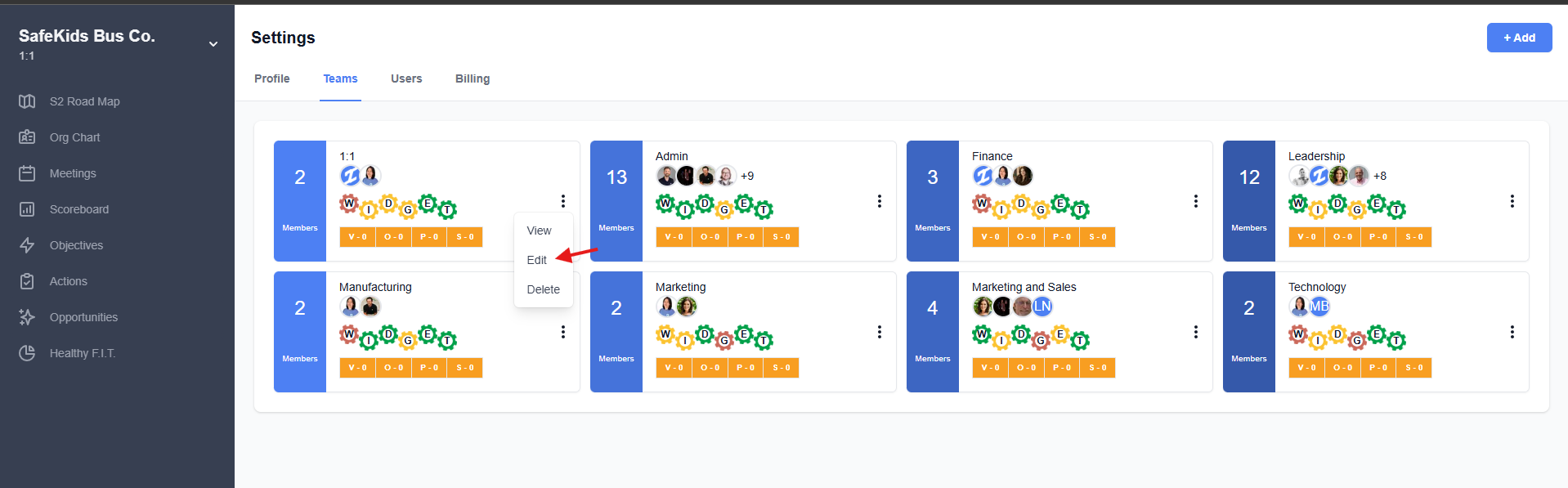
To create a team, follow these steps:
- Go to "Company Settings" in the top left corner.
- Navigate to the "Teams" tab.
- Click "Add" in the top right corner.
- Enter the team details and add any users you'd like to include.
How many teams can I create in S2 Sync?
There is no limit to the number of teams you can create in S2 Sync.
How many teams can I be a member of in S2 Sync?
You can be a member of unlimited teams within the app.
How can I switch between teams?
To switch teams:
- Click on the company name in the top left corner.
- Under the "Teams" section, you’ll see a list of all the teams you belong to.
- Click on the team name to switch to that team.
How many leadership teams can there be?
Each company can have only one leadership team.
What do I do if a user is not a member of a team?
To add a user to a team, follow these steps:
- Go to "Company Settings" in the top left corner.
- Navigate to the "Teams" tab.
- Choose a team and click on the 3 dot menu and "edit" to add a user to a team.