![S2 Icon Navy TM (2).png]](https://kb.systemandsoul.com/hs-fs/hubfs/S2%20Icon%20Navy%20TM%20(2).png?height=50&name=S2%20Icon%20Navy%20TM%20(2).png)
Using the Healthy F.I.T. Section in S2 Sync
The Healthy F.I.T. section in S2 Sync is designed for leaders to hold 1-on-1 meetings with their direct reports. This section is directly connected to your Org Chart. If a user has direct reports listed in the Org Chart, those individuals will automatically appear in the Healthy F.I.T. section, where the leader can schedule meetings with them at any time.
Viewing a Personal Road Map for Non–Direct Reports
If you want to view the Personal Road Map of someone who is not your direct report, you must first request access. Here’s how to do that:
-
Navigate to the Healthy F.I.T. section in S2 Sync.
-
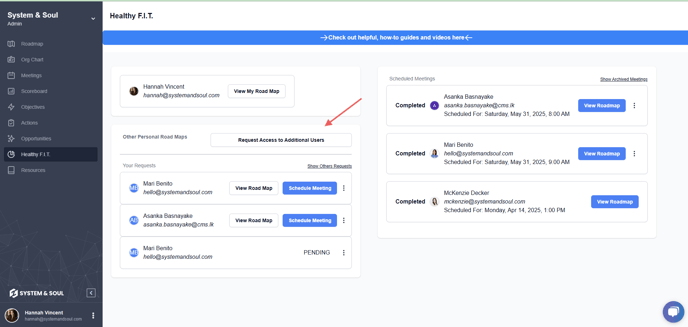
Click on “Request Access to Additional Users.”
-
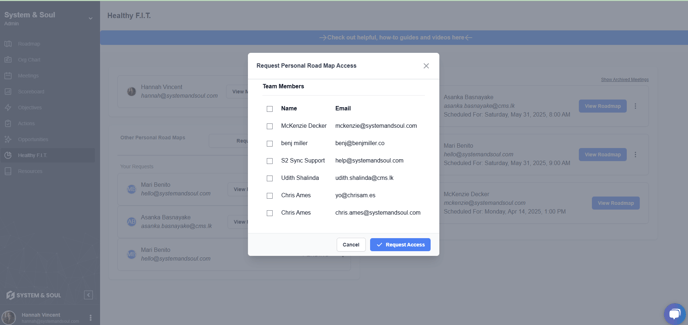
From the dropdown menu, select the user whose Personal Road Map you'd like to access, then click “Request Access.”
-
The selected user will receive an email notification and can approve or deny your request.
-
If your request is approved, their Personal Road Map will appear in your Healthy F.I.T. section after refreshing the page or the next time you log in.