![S2 Icon Navy TM (2).png]](https://kb.systemandsoul.com/hs-fs/hubfs/S2%20Icon%20Navy%20TM%20(2).png?height=50&name=S2%20Icon%20Navy%20TM%20(2).png)
There are 2 ways you can set up a group assessment:
1. Have someone from the company set it up and have their assessment included in the group results.
2. Have a coach or admin set up the assessment WITHOUT having their assessment included in the results.
How to Set Up a Group Assessment (including yourself)
Follow these steps to set up a group assessment for your client:
-
Visit s2diagnostic.com
-
Select the “Group” option on the home page
-
Add participants:
-
-
Enter the names and email addresses of the participants who will complete the assessment.
-
-
-
Take the assessment yourself
-
Be directed to the results page. From here you can see who has completed the assessment and who is still pending.
How to Set Up a Group Assessment (not including yourself)
Follow these steps to set up a group assessment for your client:
-
Visit s2diagnostic.com
-
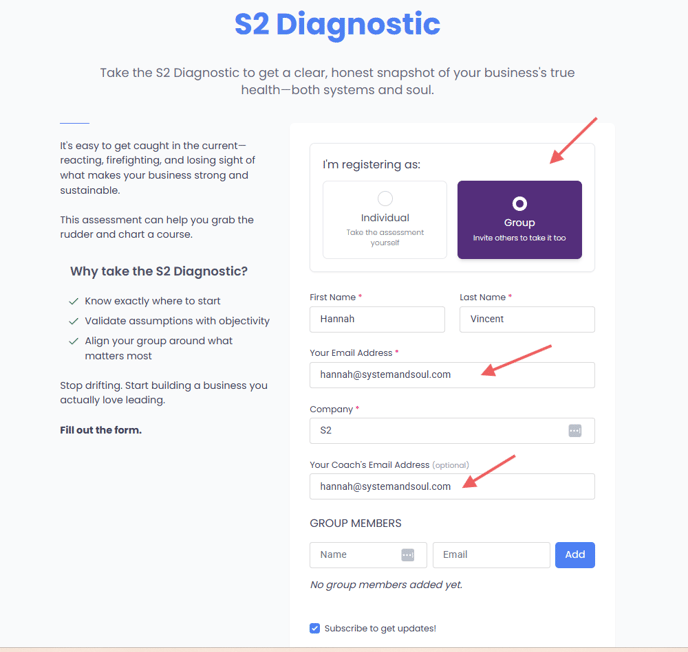
Select the “Group” option on the home page
-
Verify email alignment:
-
Make sure your email and the coach email match
-
-
Add participants:
-
Enter the names and email addresses of the participants who will complete the assessment
-
-
Once the session is created, the system will bypass the assessment questions and take you directly to the results page
Note for coaches:
💡 You can still use your custom link for individual assessments, but for group assessments you are setting up for a client, please follow this new process.