![S2 Icon Navy TM (2).png]](https://kb.systemandsoul.com/hs-fs/hubfs/S2%20Icon%20Navy%20TM%20(2).png?height=50&name=S2%20Icon%20Navy%20TM%20(2).png)
Teams were created in the app so that you can separate your account by department. Each team has their own data that is private and can only be viewed by members of that particular team.
How to create a new team:
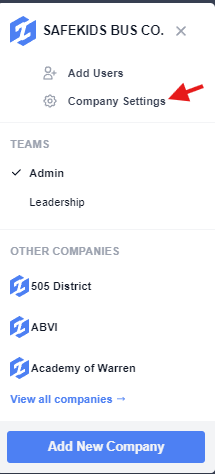
1. Click on your company name in the top left corner of your screen, then click on "Company Settings"
2. Navigate to the "Teams" tab
3. In the top right corner, click on "+ Add"
4. Fill in all of the necessary details. You will choose a team name (which can be edited at any time), select which members you'd like to add to the team, and choose the team type. 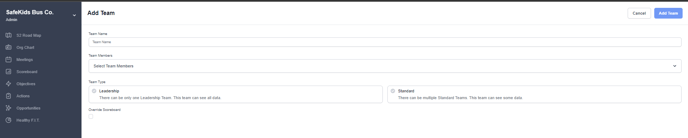
Tip: You can create as many teams as you'd like. There is no limit.
How to add users to a team:
1. Click on your company name in the top left corner of your screen, then click on "Company Settings"
2. Navigate to the "Teams" tab
3. Choose any existing team and click the 3 dots to the right and click "Edit"
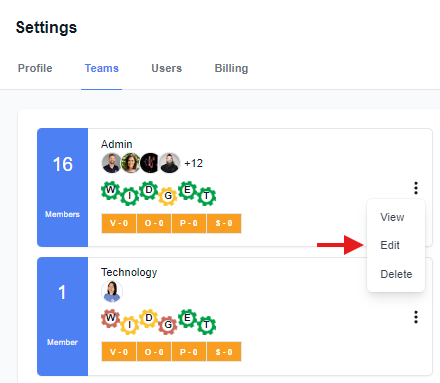
4. From here, under "Team Members" you can add any active user (currently in S2 Sync) to that team.
Still have questions? Email help@systemandsoul.com and we'll get you the answers you're looking for!